Zvec Complete Guide: From Concept to Practice
Alibaba’s production-grade, in-process vector database — millisecond responses on billion-scale data
What Is Zvec?
Zvec
Zvec is an open-source, in-process vector database developed and production-hardened by Alibaba Group. Unlike traditional client-server vector databases, Zvec runs inside your application process — much like SQLite — requiring no separate service deployment. Simply install the package and call its APIs directly.
The project has undergone years of rigorous internal usage at Alibaba, supporting high-stakes production workloads. Since its open-sourcing in 2024, it has garnered 9.3k+ stars on GitHub.
Zvec supports diverse deployment scenarios:
– ✅ Rapid prototyping & local development
– ✅ Embedded applications & edge devices
– ✅ Production systems handling billion-scale datasets
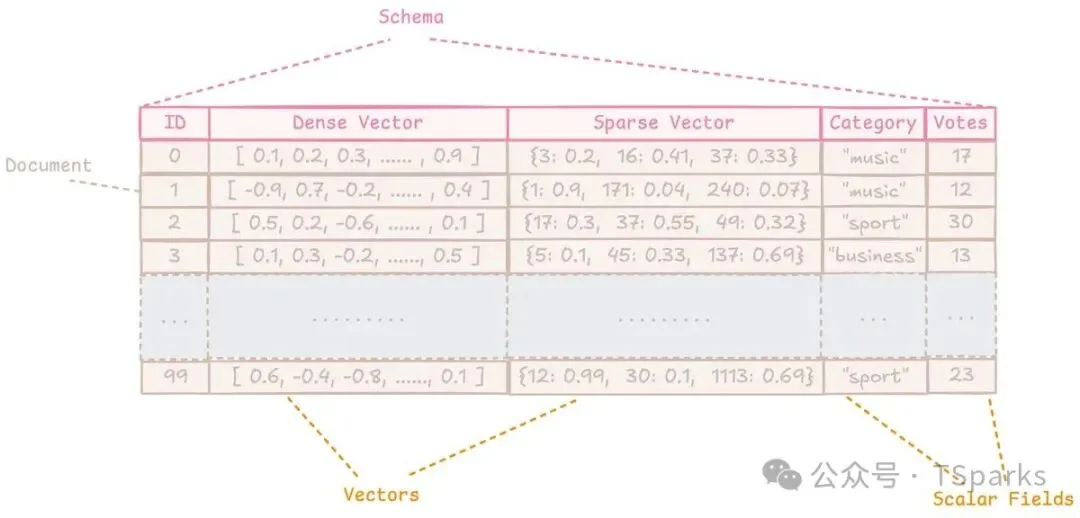
Data Model: Collection, Document, and Schema
Data Model
Zvec organizes data using three core abstractions:
📁 Collection (Vector Table)
A container for documents — analogous to a table in relational databases. Each Collection has its own strict Schema, enabling isolated evolution. For example:
– rag_docs: stores text embeddings + metadata
– image_search: stores image vectors + tags
📄 Document (Vector Record)
A fundamental unit of storage — equivalent to a row. Every document must conform to its Collection’s schema and consists of:
id: A unique string identifier (immutable after insertion)vectors: One or more vector fields (dense/sparse)fields: Scalar attributes (strings, numbers, booleans, arrays)
Example RAG Document:
{
  "id": "doc_001",
  "vectors": {"embedding": [0.12, -0.34, 0.56, ...]},
  "fields": {
    "title": "Zvec Introduction",
    "source": "https://zvec.org",
    "word_count": 1240
  }
}
🧩 Schema (Type Safety)
Strongly typed and dynamic:
– Scalar types: STRING, BOOL, INT32, INT64, FLOAT, DOUBLE, and their array variants
– Vector types: Dense (fixed-length float arrays) and Sparse (high-dimension, sparse representations)
✅ Schema is dynamic: Add/remove scalar/vector fields without rebuilding the collection.
✅ Collections persist as self-contained directories — portable across machines.
⚠️ Important limitation: No cross-collection queries (JOIN, UNION, or multi-collection search). Design with this isolation in mind.
Vector Embedding: Turning Unstructured Data into Semantics
Vector Embedding
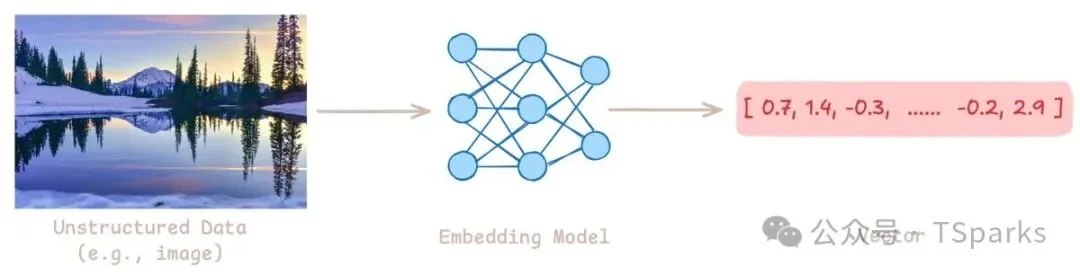
At the heart of vector search lies the embedding model, which converts unstructured inputs (text, images, audio) into numerical vectors capturing semantic meaning.
Embeddings map data into a high-dimensional space where semantically similar items are geometrically close — e.g., king − man + woman ≈ queen.
🔁 Typical Workflow:
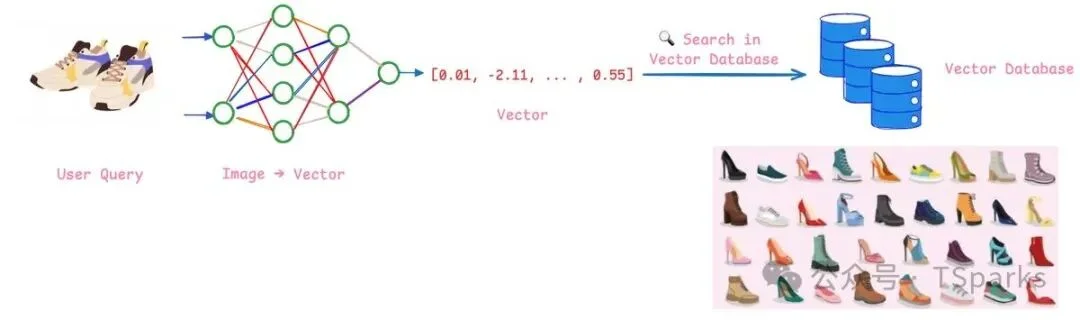
- Store: Pass raw data (documents, product images, user profiles) through an embedding model → store resulting vectors.
- Search: Encode user query with the same model → find nearest vectors via similarity metrics (cosine, dot product, Euclidean).
This enables semantic search — retrieving conceptually related content, not just keyword matches.
🧮 Supported Vector Types:
| Type | Description | Use Case |
|---|---|---|
| Dense Vector | Fixed-length real-valued array; rich semantics from deep models | General-purpose semantic search, RAG |
| Sparse Vector | High-dimensional, mostly zero-valued; ideal for bag-of-words features | Keyword-heavy retrieval, lightweight indexing |
💡 Critical Note: Always use the same distance metric during indexing and querying — mismatched metrics degrade semantic fidelity.
Vector Indexing: How Zvec Achieves Millisecond Responses at Scale
Without indexing, vector search requires exhaustive “brute-force” comparisons — impractical beyond millions of vectors.
Zvec uses Approximate Nearest Neighbor (ANN) algorithms to deliver orders-of-magnitude speedups while preserving near-perfect relevance.
🎯 Recall: The Accuracy Benchmark
- Defined as:
(ANN top-K ∩ Exact top-K) / K - Example: If exact top 10 contains 9 results returned by ANN → Recall = 90%
- ✅ ≥96% recall typically delivers indistinguishable UX vs. brute-force.
Zvec offers multiple index backends — choose based on scale, latency budget, and accuracy requirements.
DiskANN: Scaling to Billion-Vector Datasets
Introduced in Zvec v0.5.0, DiskANN (from Microsoft Research, NeurIPS 2019) enables efficient search over datasets too large for RAM.
🔑 Core Innovations:
- Vamana Graph: Single-layer navigable small-world graph with fixed entry point (medoid) — enables greedy traversal toward target region.
- Product Quantization (PQ): Compresses vectors into compact 8-bit codes; precomputed lookup tables replace expensive floating-point ops.
- Cached Beam Search: Parallel frontier expansion + hot-node caching minimizes disk I/O overhead.
⚖️ Trade-offs & Ideal Use Cases:
- ❌ Lower QPS than in-memory indexes (disk-bound)
- ✅ Perfect for:
- Datasets >1B vectors (RAM-constrained)
- Cost-sensitive deployments
- Batch/offline processing (latency-tolerant)
⚠️ Platform Note: Linux-only; requires libaio. On newer distros (e.g., Ubuntu 24.04), ABI conflicts with libaio1t64 may require source compilation.
Inverted Index: Accelerating Scalar Field Filtering
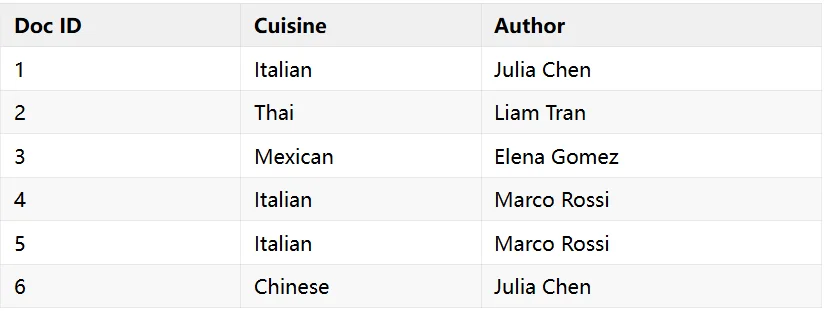
While vector search handles semantics, inverted indexes power fast filtering on scalar fields.
🔁 How It Works
- Standard view: Document → values it contains
- Inverted view: Value → list of documents containing it
Example (recipe dataset):
– Query: cuisine = "Italian" → instantly returns [1, 4, 5]
– Compound query: cuisine = "Italian" AND author = "Julia Chen" → intersect [1, 4, 5] ∩ [1, 3] = [1]
✅ Supported Filter Operations:
- Exact match:
status = "active" - Range:
age > 25 - Text pattern:
product_name LIKE "Wireless%" - Array membership:
tags CONTAIN_ANY ["sport", "music"]
⚠️ Cost Consideration: Inverted indexes increase storage and slow writes. Apply only to frequently filtered fields — skip rarely queried ones (e.g., url).
Full-Text Search (FTS): Relevance-Ranked Keyword Retrieval
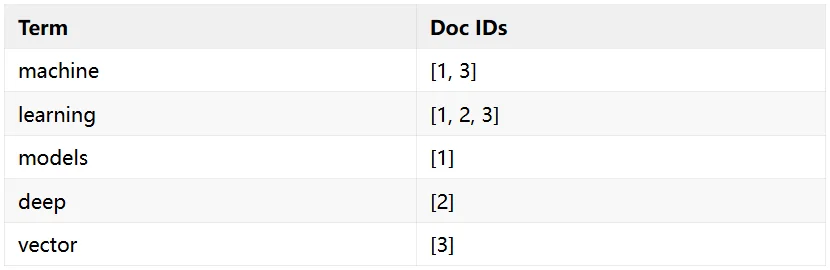
Added in Zvec v0.5.0, Full-Text Search (FTS) complements vector search with linguistically aware, ranked text retrieval.
🔄 Three-Stage Pipeline:
- Tokenization: Splits text into tokens — e.g.,
"Training machine learning models"→[training, machine, learning, models] - Inverted Mapping: Builds
token → [doc_ids]lookup - BM25 Scoring: Computes relevance per document using:
- TF (Term Frequency): Boosts repeated terms (with diminishing returns)
- IDF (Inverse Document Frequency): Rares terms get higher weight
- Document Length Normalization: Shorter docs score higher for same TF-IDF
⚡ Optimization: WAND Algorithm
Uses block-max pruning and upper-bound estimates to skip non-competitive documents — dramatically accelerating top-K retrieval.
✅ FTS Capabilities:
- Natural language queries
- Phrase matching:
"vector database" - Boolean logic:
+machine -neural - Multi-language support (English & Chinese tokenizers built-in)
- Standalone text-only collections (no vectors required)
Hybrid Search: Unifying Vectors, Text, and Filters
Zvec v0.5.0 introduces Hybrid Search, allowing simultaneous use of:
– Vector similarity (query_embedding)
– Full-text relevance ("machine learning")
– Scalar filters (publish_date > "2025-01-01")
Result: Highly precise, context-aware retrieval — e.g., “Find articles semantically similar to my query, mentioning ‘machine learning’, published after 2025.”
Persistence & Concurrency
- Durability: Uses Write-Ahead Logging (WAL) — guarantees data survives crashes/power loss.
- Concurrency Model:
- ✅ Multiple processes can read the same collection concurrently
- ⚠️ Write access is single-process exclusive — plan accordingly for high-write-throughput workloads.
Installation & Quick Start
Zvec provides official SDKs for: Python, Node.js, Go, Rust, and Dart/Flutter.
🐍 Python Quick Setup
pip install zvec
# Supports Python 3.10–3.14
# Platforms: Linux (x86_64/ARM64), macOS (ARM64), Windows (x86_64)
💡 One-Minute Demo
import zvec

# Define schema
schema = zvec.CollectionSchema(
    name="example",
    vectors=zvec.VectorSchema("embedding", zvec.DataType.VECTOR_FP32, 4),
)

# Create & open collection
collection = zvec.create_and_open(path="./zvec_example", schema=schema)

# Insert documents
collection.insert([
    zvec.Doc(id="doc_1", vectors={"embedding": [0.1, 0.2, 0.3, 0.4]}),
    zvec.Doc(id="doc_2", vectors={"embedding": [0.2, 0.3, 0.4, 0.1]}),
])

# Vector search
results = collection.query(
    zvec.VectorQuery("embedding", vector=[0.4, 0.3, 0.3, 0.1]),
    topk=10
)
print(results)
🔧 Prefer GUI? Try Zvec Studio, a visual tool for browsing data and debugging queries.
Final Thoughts
Zvec embodies the “lightweight but battle-tested” philosophy — equally capable for local prototyping and billion-vector production workloads. With v0.5.0’s additions — full-text search, hybrid retrieval, and DiskANN — it now delivers comprehensive capabilities for modern AI applications:
– 🤖 RAG pipelines
– 🔍 Semantic search engines
– 📊 Recommendation systems
If you seek performance without infrastructure bloat, Zvec deserves serious evaluation.
🔗 Official Resources: zvec.org | GitHub
Article by Yao Zijie — Published by AITNT AI Technology Report